
Knowledge base software is transforming how organizations manage and share information. It offers a centralized platform for storing and accessing knowledge. This software is crucial for enhancing customer support and internal communication.
Businesses are increasingly adopting knowledge base software to streamline operations. It reduces the need for direct support interactions by providing self-service options. This leads to improved efficiency and customer satisfaction.
In 2025, the demand for robust knowledge management tools will continue to grow. Companies will seek solutions that integrate seamlessly with help desk software. This integration will optimize support processes and boost productivity.
Choosing the right knowledge base software is vital. It should align with your organization’s needs and industry requirements. This guide will explore the features, benefits, and top tools for 2025.
Summary
Knowledge base software centralizes information to improve self-service, support efficiency, and internal collaboration, with growing 2025 demand for solutions that integrate with help desk tools. Key features span advanced search, categorization, customization, analytics, and security, delivering benefits like lower support costs, higher productivity, and greater customer satisfaction. Distinct from help desk and broader knowledge management platforms, selection should focus on fit, usability, integrations, scalability, and budget. Top tools include Zendesk, Confluence, Notion, Freshdesk, and Document360, and success depends on strong implementation and leveraging AI-driven search, personalization, and broader integrations.
What Is Knowledge Base Software?
Knowledge base software is a digital platform designed to store and manage information. It acts as a repository where users can easily find answers and solutions. This type of software helps in organizing data efficiently across various categories.
Typically, knowledge base software includes search capabilities for quick retrieval. Users can
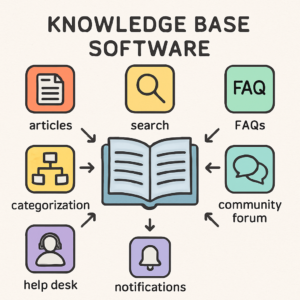
access FAQs, articles, guides, and other resources with ease. It serves as a helpful tool in customer support, providing instant solutions without human assistance.
Some common components of knowledge base software include:
- Robust search engine
- Content categorization
- User access controls
Many businesses use it to streamline internal operations and improve customer interactions. By offering 24/7 access to information, it enhances user satisfaction significantly. For businesses, implementing knowledge base software can lead to reduced costs and increased productivity.
Atlassian – What Is a Knowledge Base? (Confluence Guide)
👉 https://www.atlassian.com/software/confluence/knowledge-base
Key Features of Knowledge Base Software
Modern knowledge base software comes with a range of features that enhance information management. These features make it easier for both employees and customers to find the information they need promptly.
A key feature is the advanced search functionality, which allows users to locate content using relevant keywords quickly. This capability minimizes the
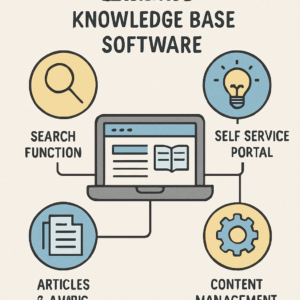
time spent searching for information.
Another important aspect is content categorization. This allows for the efficient organization of data into topics or themes, which simplifies navigation. Users can find related information faster, which enhances user experience.
Additionally, customizable templates and branding options provide a personalized touch. Businesses can align their knowledge base’s appearance with their overall brand identity. Moreover, these tools often include analytics to help track usage patterns and identify content gaps.
Key features include:
- Search functionality
- Content categorization
- Customizable templates
- Analytics and reporting
Security features like encryption and access controls ensure data protection. These safeguards are crucial for organizations handling sensitive information.
Benefits of Using Knowledge Base Software
Knowledge base software offers numerous benefits that significantly enhance organizational efficiency. One of the primary advantages is the reduction in support costs. By providing customers with self-service options, businesses can deflect support tickets, freeing up resources.
These tools also improve employee productivity. With quick access to vital information, staff can resolve issues more efficiently. This reduction in time spent searching for answers allows employees to focus on more complex tasks.
Moreover, a well-maintained knowledge base can enhance customer satisfaction. By offering immediate access to accurate information, customers are empowered to find solutions independently. This experience can lead to increased loyalty.
Additionally, knowledge base software fosters better internal communication and collaboration. Teams can easily share and access information, facilitating smoother operations and decision-making.
Benefits include:
- Reduced support costs
- Increased employee productivity
- Enhanced customer satisfaction
- Improved internal communication
Overall, implementing a knowledge base can transform how information is managed and shared within an organization.
Knowledge Base Software vs. Help Desk Software vs. Knowledge Management Tools
Understanding the difference between knowledge base software, help desk software, and knowledge management tools is crucial. These tools, while complementary, serve distinct purposes.
Knowledge base software focuses on organizing and delivering information efficiently. It is designed to provide users with access to a library of articles and FAQs.
Help desk software, on the other hand, primarily manages customer inquiries and issues. It coordinates communication between users and support teams, streamlining ticket resolution.
Knowledge management tools are broader in scope. They encompass systems for capturing, distributing, and effectively utilizing knowledge within organizations.
Key differences include:
- Knowledge Base Software: Centralized information access
- Help Desk Software: Customer inquiry management
- Knowledge Management Tools: Comprehensive knowledge distribution
By understanding these distinctions, organizations can select the right tools for their specific needs.
How to Choose the Right Knowledge Base Software
Selecting the ideal knowledge base software for your business can be challenging. Begin by assessing your organization’s specific needs and goals.
Consider factors like team size, budget, and the complexity of the knowledge you need to manage. Ensure the software aligns with your existing systems and workflows.
Evaluate key features such as search capabilities, user interface, and customization options. Additionally, look for robust integration possibilities with other tools you use.
Finally, consider user experience and support options. A user-friendly design and reliable customer support can make all the difference.
Key considerations include:
- Compatibility with existing tools
- Ease of use and support
- Feature set and customization
- Budget and scalability
Choosing the right software can enhance efficiency and improve information accessibility.
The Best Knowledge Base Software Tools for 2025
In 2025, businesses have many powerful options for knowledge base software. Each tool offers unique features and advantages suitable for different organizations.
It’s important to select a tool that aligns with your specific needs and business strategies. Robust search capabilities, customization, and integration are key aspects to consider.
Below, we explore some of the top knowledge base software tools expected to lead the market in 2025. These tools cater to a wide range of industries and organizational requirements.
Zendesk
Zendesk excels in user-friendliness and seamless integration with help desk software. It’s perfect for businesses seeking a reliable customer support system.
The platform features powerful analytics and customizable templates, ensuring a tailored user experience.
Confluence
Confluence by Atlassian is ideal for collaboration and document management. Its integration with other Atlassian products makes it a strong choice for project-oriented teams.
A notable feature is its extensive user permissions settings, which enhance security and control.
Notion
Notion stands out for its flexibility and ease of use. It allows users to build comprehensive knowledge bases with a simple drag-and-drop interface.
It’s suitable for both small startups and large enterprises looking for an adaptable solution.
Freshdesk
Freshdesk combines help desk and knowledge base capabilities. It is designed to streamline customer support and improve workflow efficiency.
With features like automated ticketing and detailed reports, Freshdesk enhances service quality and operational insight.
Document360
Document360 focuses on documentation and offers a robust feature set for knowledge management. Its intuitive interface supports quick and efficient knowledge creation.
It is especially beneficial for software companies in need of detailed technical documentation.
Each of these tools is distinguished by unique strengths. They all offer potential solutions to meet the evolving needs of businesses in 2025. Businesses should evaluate them based on their specific requirements for maximum benefit.
Tips for Successful Knowledge Base Implementation
Implementing a knowledge base requires careful planning and execution. Ensure that your content is relevant and regularly updated for accuracy. Assign a dedicated team to oversee the knowledge base’s maintenance.
Here are some key tips to consider:
- nvolve key stakeholders during the initial setup.
- Regularly solicit feedback from users to improve content.
- Utilize analytics to identify high-demand topics and address content gaps.
By following these strategies, you can create an effective knowledge base that serves your organization well. These efforts will empower users and streamline support operations.
Future Trends in Knowledge Base Software
The future of knowledge base software looks promising with new advancements. Artificial intelligence is set to revolutionize search and personalization. Expect AI to help users find precise information faster.
Machine learning will further enhance content recommendations. This can lead to more intuitive user experiences. It adapts to user behavior seamlessly.
Additionally, expect integration with more diverse platforms. As more businesses move online, seamless connectivity becomes crucial. Keep an eye on these trends to stay competitive.
- AI-driven search enhancements
- Machine learning for personalized content
- Broader platform integration
Conclusion
Knowledge base software is vital for efficient information management. It streamlines support and empowers users. Businesses must choose tools that fit their needs and scale with growth.
Adopting the right software ensures a competitive edge. It enhances customer satisfaction and internal collaboration. Invest wisely in a knowledge base solution to drive success in 2025 and beyond.
if you like the Global3News blog, Please Subscribe my Website and watch more interested Blog